Discord commands
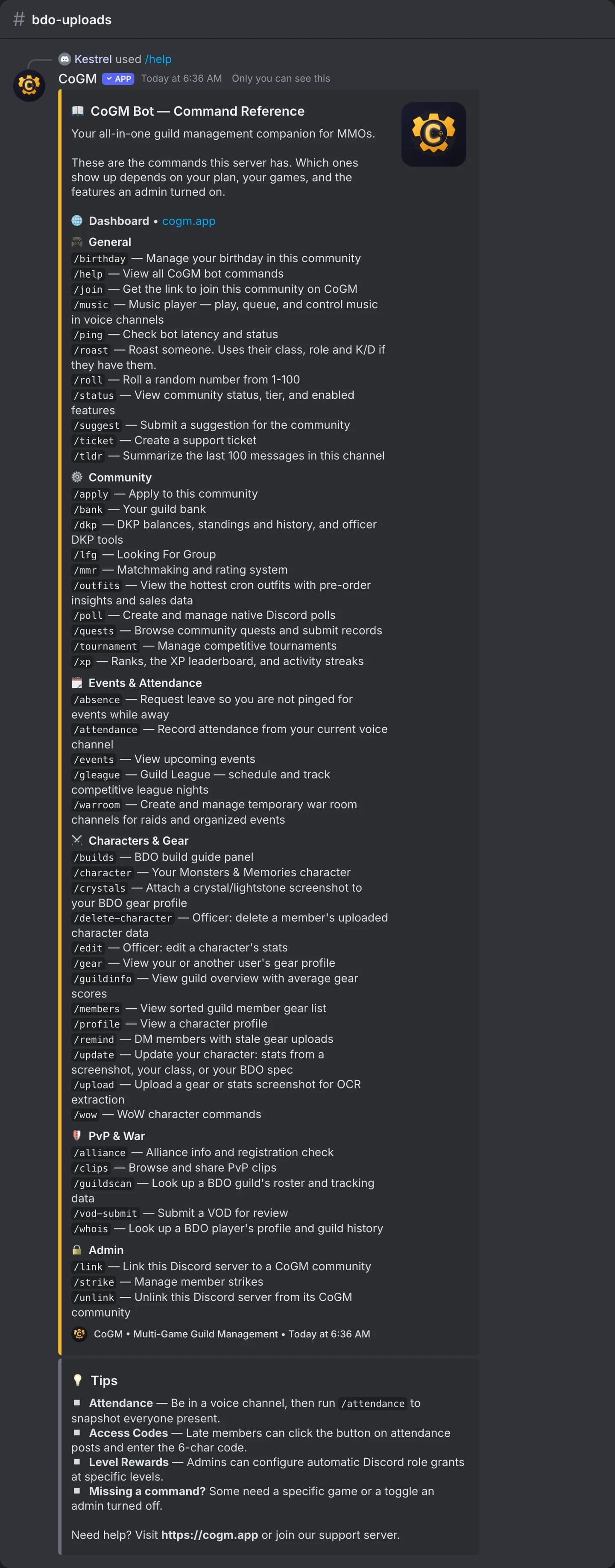
Type / in Discord to browse them. Commands marked Always work in any server the bot is in, even before you link a community. The rest appear once the server is linked, and only where they apply.
Why a command is missing
Discord only shows a command where it can run. A game command needs a guild for that game in your community. A Pro command needs at least one guild on Pro or a trial. A switchable feature, like Looking for Group or Music, needs to be turned on. Run
/status to see your plan and features, or /help for the exact list in this server.Always on
| Command | What it does | Access |
|---|---|---|
| /tldr | Summarize the last 100 messages in this channel. One use per channel every 10 minutes. | Always |
| /roast | Roast a member, or yourself. In a Black Desert Online guild it uses their class, war role, gear score and K/D. No cooldown. | Always |
| /ping | Check that the bot is online and how fast it answers. | Always |
| /roll | Roll 1 to 100, your own range with min and max, or dice like d20 or 2d6. | Always |
| /help | List the commands this server can use, grouped by job. | Always |
| /link | Link this Discord server to a CoGM community with a /link code from the community's Discord settings. The code works once, for 24 hours. Needs Manage Server. | Always |
| /unlink | Unlink this Discord server from CoGM after a confirm. Data on the dashboard stays. Administrator only. | Always |
Gear & roster
| Command | What it does | Access |
|---|---|---|
| /upload | Upload a gear, Stat Info, character panel or character window screenshot. OCR fills the character sheet. | Free |
| /update | Re-read your stats from a new screenshot (/update stats, or /update gear where BDO runs), or change your class, without a new upload. Works for BDO, Aion 2, WoW Forever and Monsters & Memories; BDO also changes spec here. | FreeBDOWoWAion 2M&M |
| /gear | Show your or another member's gear: the BDO gear profile, or the Aion 2 or WoW Forever character card in that game's channel. | FreeBDOWoWAion 2 |
| /profile | Show an Aion 2, WoW Forever or Monsters & Memories character card: stats and level, plus guild rank where the game has a gear score. Pick any of a member's characters. | FreeWoWAion 2M&M |
| /members | Sorted guild gear list. Filter by class and sort by the game's stats: gear score, AP and DP for BDO; Item Level and Combat Power for Aion 2; item level, level, health and more for WoW; level, armor class and attributes for Monsters & Memories. WoW and Monsters & Memories list each member's main. | FreeBDOWoWAion 2M&M |
| /edit | Officer: correct one field on a member's character. Aion 2 covers name, class (the role follows it), level, Item Level, Combat Power, title and every stat. WoW Forever covers name, class, role, race, faction, spec, level and every stat. | FreeBDOWoWAion 2 |
| /delete-character | Officer: remove a member's uploaded character from the roster. | FreeBDOWoWAion 2M&M |
| /character edit | Change your Monsters & Memories character's name, race, class, level, server or faith, or make it your main. Officers can edit anyone's. | FreeM&M |
| /remind | Officer: DM members whose gear, Stat Info, character panel or character window screenshot is older than N days, or who never uploaded. | Free |
| /crystals | Attach a crystal or lightstone screenshot to your BDO gear profile. | FreeBDO |
| /guildinfo | A guild's member count, how many have uploaded, and the average gear score for BDO or Item Level for an Aion 2 legion. | FreeBDOAion 2 |
| /builds | Post or refresh the self-service BDO build panel. | ProBDO |
| /wow | WoW Forever: /wow gear shows a character and /wow members lists the guild. Forever shows the /profile card. | FreeWoW |
| /bank search | How many of an item the guild bank holds, in which place, and how old each count is. | ProWoWM&M |
Events
| Command | What it does | Access |
|---|---|---|
| /events | List upcoming events with signup counts, and sign up for the first one. | Free |
| /attendance | Officer: record everyone in your voice channel against an activity template. | Free |
| /absence | File or cancel leave so you are not pinged for events. | Free |
| /warroom | Create, list, or close a temporary text and voice war room. | Pro |
Looking for Group
| Command | What it does | Access |
|---|---|---|
| /lfg | Create, list, or close a Looking for Group post. Pick an activity from this guild's game, or a custom template. Seats, start times, and WoW Forever faction, ruleset and region. | Free |
| /lfg statics | Your weekly statics: the next session, your seat and its menus. Statics need the guild on Pro. | Pro |
PvP & war
| Command | What it does | Access |
|---|---|---|
| /whois | Look up a BDO family name: profile, guild, and guild history. | FreeBDO |
| /alliance | Your community's BDO guilds with size and average gear score, and a check for server members not on CoGM. | FreeBDO |
| /guildscan | Look up a BDO guild's roster on the official site by name and region. Manage Server only. | FreeBDO |
Guild League
| Command | What it does | Access |
|---|---|---|
| /gleague | Post a league night, submit match results from a screenshot, and check the season record. | ProBDO |
Recruitment
Moderation
| Command | What it does | Access |
|---|---|---|
| /strike | Issue, view, or pardon member strikes. | Free |
Community
| Command | What it does | Access |
|---|---|---|
| /status | The community's plan, guilds and enabled features. | Free |
| /xp rank | Your level, XP and rank, or another member's. | Free |
| /xp leaderboard | Community XP leaderboard. | Free |
| /xp streak | Show your activity streak and milestones. | Pro |
| /quests list | Browse community quests. | Free |
| /quests submit | Submit a record for a quest, with evidence, in your DMs. | Free |
| /ticket | Open a support ticket in a private thread. | Free |
| /poll create | Create a native Discord poll. | Free |
| /poll end | End a poll early by message id. | Free |
| /birthday | Set, list or remove birthdays. | Free |
| /tournament | Create a bracket, add teams, report scores, show standings. | Pro |
| /mmr | Register, queue, and report results on a matchmaking ladder. | Pro |
| /music | Play songs in a voice channel, with a queue and saved playlists. | Pro |
Clips & VOD
| Command | What it does | Access |
|---|---|---|
| /clips | Browse, roll, or submit PvP clips. | ProBDO |
| /vod-submit | Submit a YouTube or Twitch VOD to a review channel. | FreeBDO |
Economy
| Command | What it does | Access |
|---|---|---|
| /outfits | Cron outfit market: fastest pre-orders and hot sellers. | ProBDO |
| /dkp balance | Your DKP balance in each guild, plus today's progress toward the voice activity reward when the guild has it on. | FreeWoWM&M |
| /dkp standings | The guild's DKP standings, with your own rank. Tied balances share a rank. | FreeWoWM&M |
| /dkp history | The latest DKP changes for you or another member, with a link to the full ledger. | FreeWoWM&M |
| /dkp adjust | Officers: add or take DKP from one member, with a reason for the ledger. Name the item to record an item win. | ProWoWM&M |
| /dkp award | Officers: give the same DKP to everyone in a voice channel who is on the guild's roster, after a confirm. | ProWoWM&M |
| /auction start | Officers: auction one item, or a round of up to 5, for DKP. Open or sealed, with presets and anti-snipe. | ProWoWM&M |
| /auction bulk | Officers: start up to 25 items from a typed list, or from a boss's drops on Monsters & Memories. | ProWoWM&M |
| /auction status | What you can bid: your balance, what your open bids hold, and what is left. | ProWoWM&M |
| /auction handover | Officers: sold items still to hand over. | ProWoWM&M |
| /auction reverse | Officers: undo a sale. | ProWoWM&M |
| /auction award | Officers: give an unsold item to a member, for a price or free. | ProWoWM&M |
| /auction rolloff | Officers: a recorded roll-off for an item, with optional MS and OS tiers on WoW Forever. | ProWoWM&M |
| /auction relist | Officers: run an unsold item again as a new auction. | ProWoWM&M |
Who counts as an officer
Gear and roster commands say "officer". That means the community owner or an admin, anyone with the guild's officer role in Discord, or anyone whose guild role has Manage Gear or Manage Guild Members. Other commands name the exact permission they need on their page. If you lack it, the bot tells you in a reply only you can see.
See it in your server
BDO
For the desktop war logger, see CoGM Logger. It is not a slash command.