CoGM Logger
A Windows app that records the war from the combat messages your game receives, then uploads it to your guild. That fills the war recap, the kill map and each player's K/D. It also reads your guild's war score and your Guild League matches.
On CoGM Logger 1.36 or older?
Who can use it
- Game: Black Desert Online.
- Plan: the logger, the war upload and the war score are free for every guild. Pro adds Guild League matches, the in-game overlay and Shotcaller VOD, the war's audio on the war page.
- Permissions: anyone in the guild can run the logger with the guild's token. Creating or revoking the token needs Manage PvP Analytics.
- Computer: Windows 10 or 11, the same PC that runs Black Desert Online.
Every Black Desert Online member sees CoGM Logger in the guild sidebar. That page has the download, the setup steps and answers to common problems. Anyone can also read the public page at cogm.app/logger.
Set it up
About ten minutes the first time, and you only do it once. The same steps sit on the CoGM Logger page, next to the download.
Download it
Click Download for Windows on the CoGM Logger page. The app is not code-signed yet, so your browser may hold the file as unknown or uncommon. In Chrome, choose Keep. In Edge, open the menu next to the download, choose Keep, then Keep anyway.
Get past the Windows warning
When you open the file, Windows may say Windows protected your PC. Click More info, then Run anyway. Windows shows this because the app is new and not signed yet.
Run the installer
Run cogm-logger-installer.exe and click Yes when Windows asks to allow changes. The installer checks for Npcap, the free Windows driver the logger needs to read the game. Have it already? Nothing to do. If it is missing, the installer downloads it from npcap.com and opens the Npcap setup:
- Click I Agree.
- Keep Install Npcap in WinPcap API-compatible Mode ticked.
- Leave Restrict Npcap driver's access to Administrators only unticked.
- Click Install. When it is done, click Next, then Finish.
No internet, or the Npcap download failed? Get Npcap from npcap.com, install it with the same two settings, then open the logger.
Or use the portable .zip
Unzip it to any folder and run cogm-logger-win_x64.exe. The .zip does not install Npcap, so install it from npcap.com first, with the same two settings.
Get your guild's token
An officer opens the guild's Settings → PvP Analytics and clicks Generate Token under CoGM Logger. Each guild has one token, shared by everyone who records for it, so wars land in the right event log. CoGM shows it once, so copy it then. If the guild already has a token, get it from whoever set it up: Regenerate replaces it for everyone. If you cannot open that page, ask an officer for the token.
Paste it into the logger
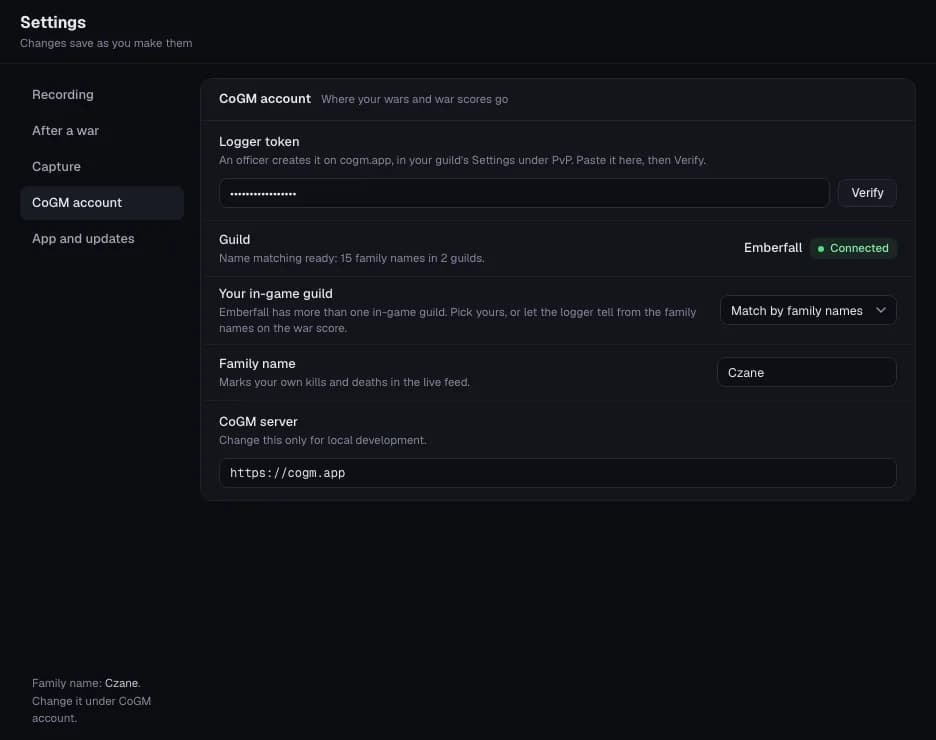
In the logger, click Settings, then CoGM account. Paste the token into Logger token and click Verify. It says Token accepted and names the guild your wars go to. Then type your Family name, so the logger can mark your own kills and deaths. If your guild has more than one in-game guild, pick yours under Your in-game guild, or leave it to match by family names.
The token and your settings stay saved through updates.
One token per guild
War night
Check the capture
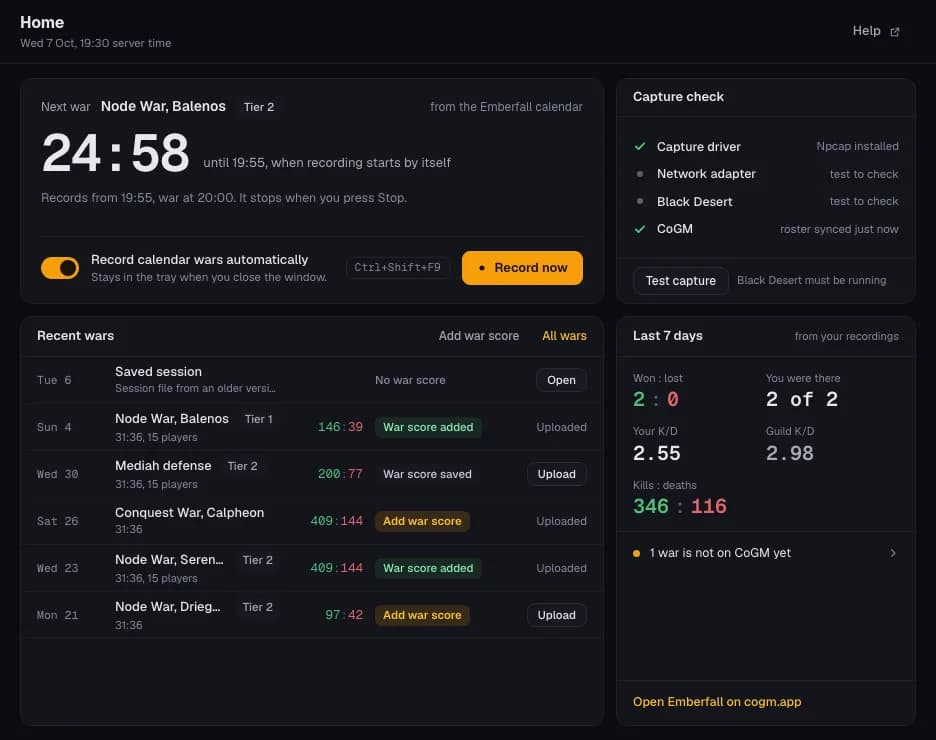
Start Black Desert Online and open the logger. On Home, click Test capture. When the side menu says Ready to record, you are set.
Record
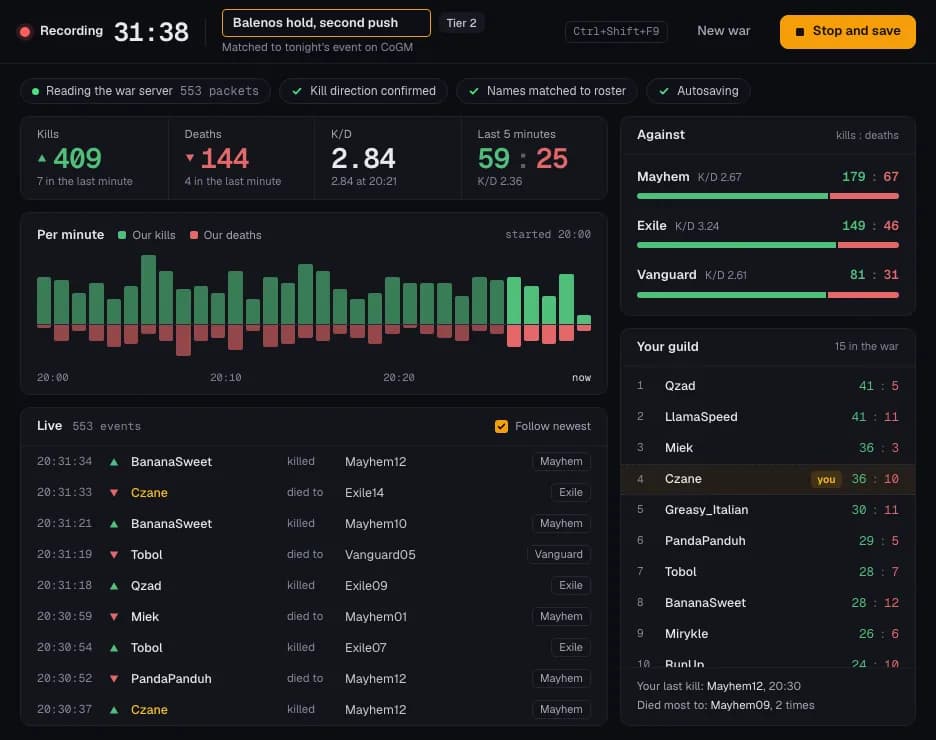
Click Record now when the war starts, or let the logger start by itself (see Record wars by themselves). Kills show up as they happen, with your guild's K/D and each enemy guild's.
Type a name in the Title box at the top if you like. It becomes the war's name on CoGM and in Wars. Leave it empty to keep the name shown in the box. Two wars in one night? Click New war between them, so each one uploads on its own.
If the logger shows Names not matched: fix name order, click it, choose Match to my roster, check the preview and save.
Stop and get the war score
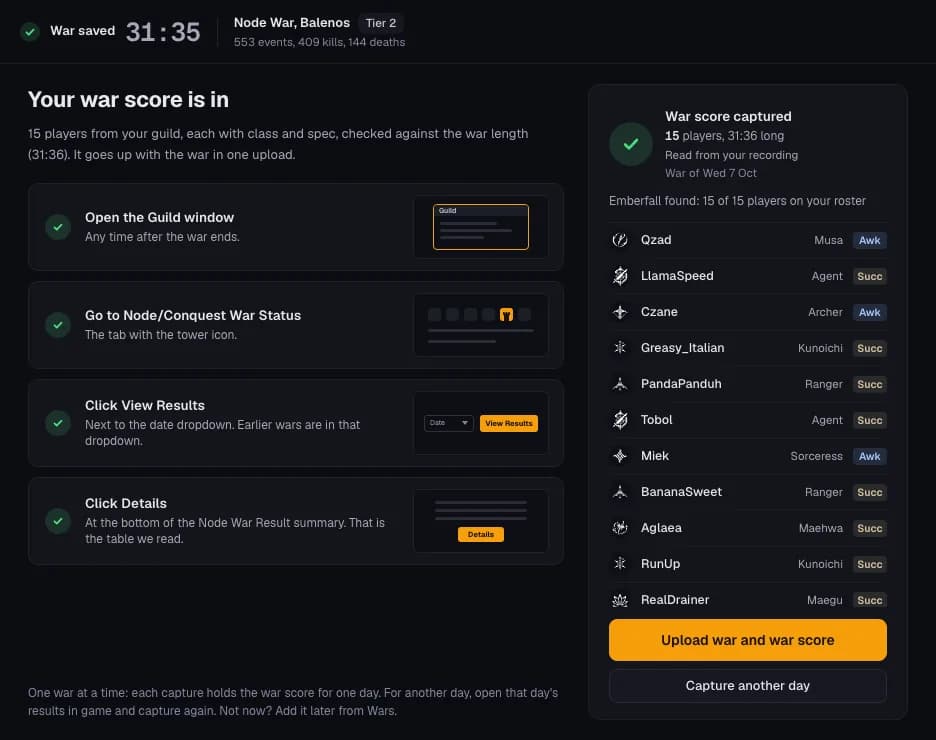
When the war ends, click Stop and save. The logger saves the war on your PC and opens the war score step. It reads your guild's war score from the game: exact numbers, plus the class and spec of everyone in your guild who fought.
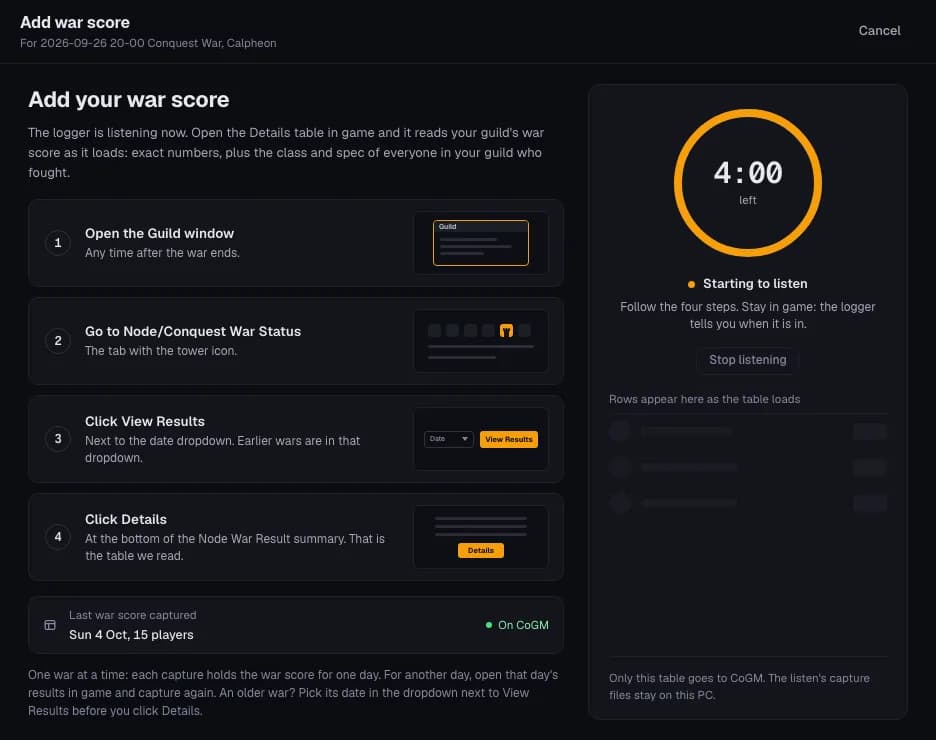
It checks the recording first. If the results were open in game before you clicked Stop, the war score is already in it. If not, the logger listens (4 minutes by default) while you do this in game:
- Open the Guild window.
- Go to Node/Conquest War Status, the tab with the tower icon.
- Click View Results, next to the date dropdown.
- Click Details, at the bottom of the Node War Result summary.
When it says War score captured, click Upload war and war score. Stop listening ends the wait early. Skip, upload without it goes on to the upload. Don't ask after wars turns this step off; turn it back on in Settings → After a war.
Upload it
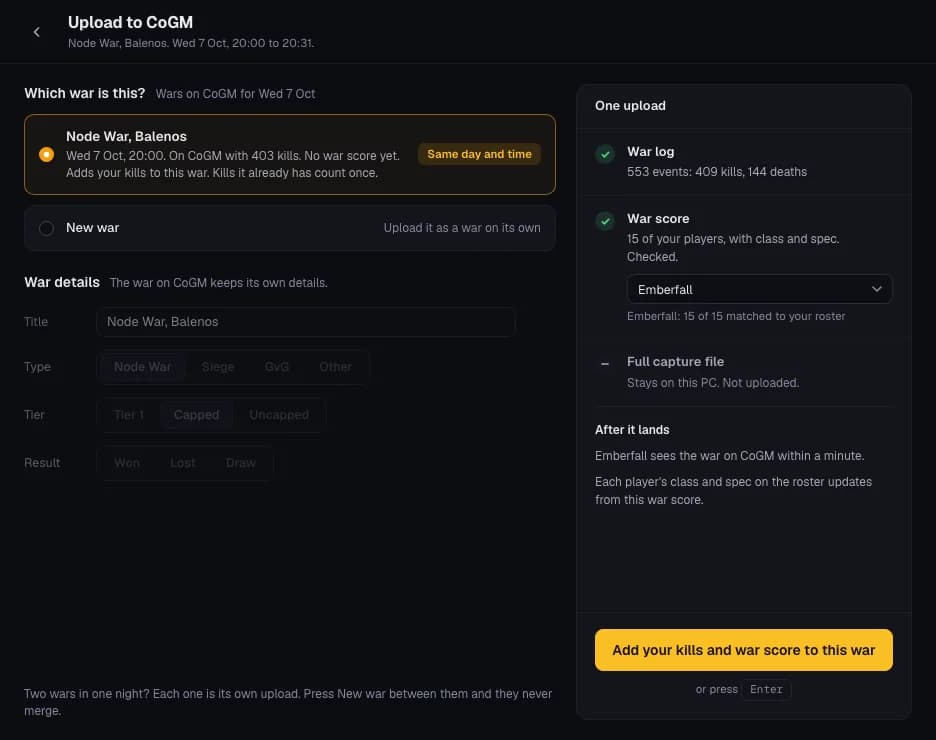
Upload asks Which war is this? and lists the wars CoGM already has that day. If someone in your guild already uploaded this war, pick it: your kills and your war score go into that war, and kills it already has count once. When CoGM has that war's real times, it is tagged Same day and time and picked for you. Otherwise pick New war.
Under War details, check the title, type, tier and result. A war already on CoGM keeps its own. Then click Upload war and war score (or Upload war when there is no war score, or Add your kills and war score to this war for a war on CoGM). When it says Uploaded to CoGM, click Open on CoGM to see the war. It also lands in PvP Events → Event Log.
If you upload as a new war and CoGM finds the same kills on a war it has, Upload asks Is this the same war? It shows that war's kills, yours, and how many of yours it doesn't have yet. Add to this war adds them, and Separate fight uploads yours as a war of its own. Nothing goes up until you answer, the war score included. When the logger uploads by itself after a war, it waits for your answer too: Windows tells you once, and Wars shows Waiting for your answer.
If CoGM can't tell which of your in-game guilds the war score belongs to, Upload asks you to pick it.
On Pro: the overlay and Shotcaller VOD
The in-game overlay draws over Black Desert Online while you record: your kills and deaths, your guild's numbers, the guilds you fight and who to call out. Drag or hide each panel. Once locked it is click-through, and it never touches the game client.
Shotcaller VOD puts the war's audio on the war page. Both need the guild on Pro. See the overlay on cogm.app/logger.
Record wars by themselves
Turn on Record wars automatically in Settings → Recording, or the same switch on Home (it reads Record calendar wars automatically when the calendar has wars). The logger then starts recording a few minutes before each war and keeps going until you click Stop and save.
- From your guild's calendar: once the token is in, the logger follows the node wars and sieges on your guild's calendar on CoGM. Home shows the next one with a countdown.
- War times: when the calendar has no wars that week, the logger uses the usual times for your guild's region on CoGM: 20:00 Central European time in Europe, 21:00 US Eastern in North America, 21:00 Brasília time in South America and 21:00 Singapore time in Southeast Asia. Node wars run Sunday to Friday and the Conquest War on Saturday. Change them under War times in Settings → Recording. Start recording early sets how far ahead it starts (5 minutes by default).
- Keep the logger running: leave it open, or turn on Keep running in the tray. Closing the window then hides it, and the recording and the schedule go on. Start with Windows opens it in the tray when you sign in.
- Record hotkey: Ctrl+Shift and an F key you pick start and stop a recording without leaving the game.
Add a war score later
Click War score in the side menu, or Add war score on Home or Wars. The logger listens while you do the same four steps in game. Started from a saved war, it checks that war's recording first. For an older war, pick its date in the dropdown next to View Results before you click Details. The war score goes to the war on CoGM from that date.
Each capture holds the war score for one day. For another day, click Capture another day and open that day's results.
Wars
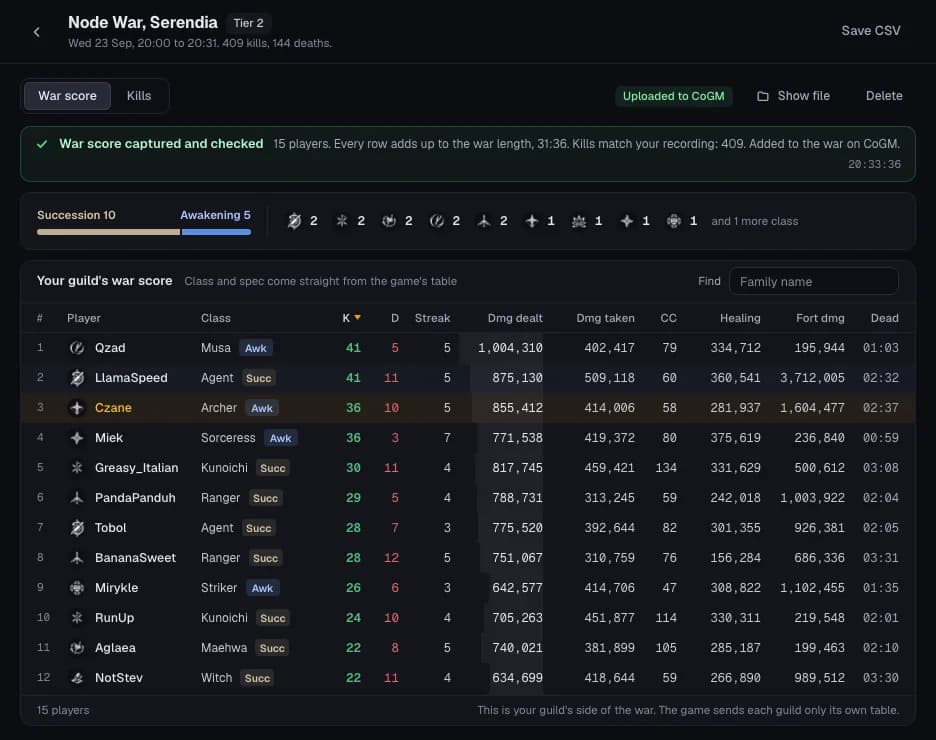
Wars lists every war saved on your PC, newest first. The files are in Documents/CoGM Logger. Each row shows whether the war score is in and whether the war is on CoGM, with Upload when it is not.
Open a war to see its war score, with each player's class and spec, and its kills by guild and player. You can rename a war there until you upload it. Open file opens a war file from another PC. If the logger closed while it was recording, Home and Wars offer to recover the war, and nothing is lost.
Guild League
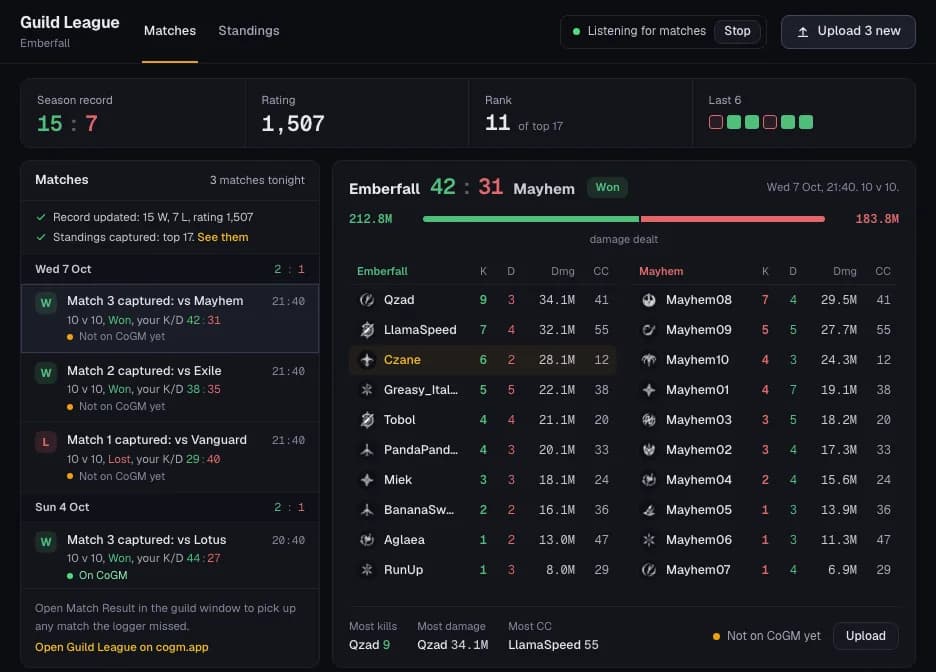
On Pro, the logger reads your Guild League matches, your season record and the standings, and sends them to your guild's Guild League section on CoGM.
- Click Guild League in the side menu, then Start listening before your first match. It listens until you click Stop.
- Play. Each match shows up when it ends, with both teams.
- Missed one? Open Match Result in the guild window and it comes in again.
- Open View Rankings in the guild window for the standings.
- Click Upload to send the new matches to CoGM.
Your roster has to be synced first: click Verify in Settings → CoGM account. A match reads Result not confirmed yet until CoGM knows which result is a win. The officer who made the token needs permission to manage Guild League on CoGM.
Settings
- Recording: Record wars automatically, the record hotkey, the tray, Start with Windows and the war times.
- After a war: whether to ask for the war score when a war stops, how long to listen (2, 4 or 6 minutes), Upload as soon as the war score is in, and Windows notifications.
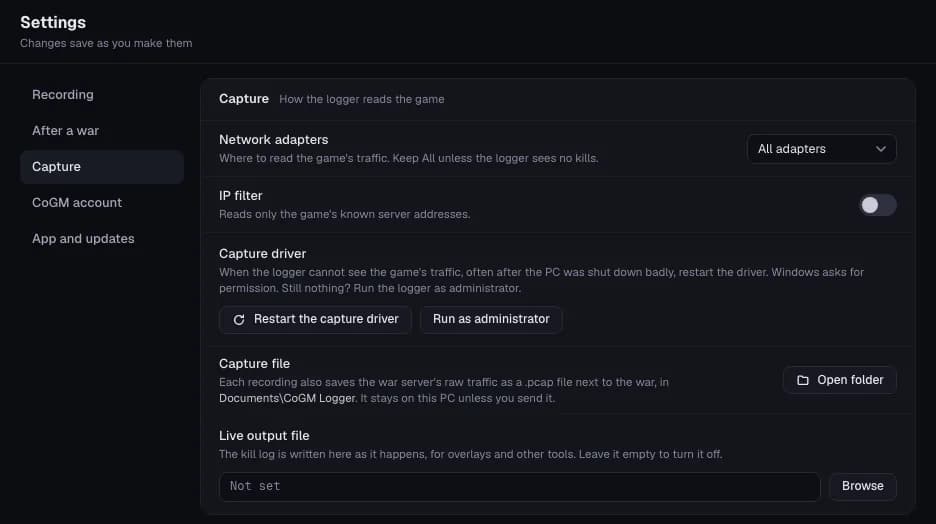
- Capture: Network adapters, IP filter, Restart the capture driver, and where the capture and live output files go.
- CoGM account: the logger token, your in-game guild and your family name.
- App and updates: the version, Check now, the logs folder and this guide.
Updates
From 2.0, the logger checks for a new version when it opens and every few hours, and downloads it in the background. Home then says Version … is ready. It installs when you close the logger. Click Restart now to install it straight away. An update never stops or blocks a recording. Version 1.37 checks when it opens and installs the new version right away, so Record waits until it is done. If Windows asks to allow changes, click Yes. Your token and settings stay saved.
From 1.37 or older with the portable .zip? After updating, open CoGM Logger from the Start menu, delete the old portable folder and type your family name again in Settings.
On version 1.36 or older? You can update it by hand: install the newest version over it from the CoGM Logger page.
Fix a problem
- No kills appear while I record. Npcap is missing or lacks the WinPcap API-compatible setting. Reinstall it from npcap.com with Install Npcap in WinPcap API-compatible Mode ticked and Restrict Npcap driver's access to Administrators only unticked. Restart the logger, start the game and click Test capture on Home.
- I play through a VPN or have two network adapters. In Settings → Capture, set Network adapters to All adapters and turn IP filter off. Then click Test capture on Home again.
- The game runs on another PC. The logger reads the game's network traffic, so it has to run on the PC that runs Black Desert Online. Install it on that PC.
- My antivirus quarantined the logger. Open your antivirus, restore the logger from quarantine and mark it as allowed. Then open the logger again.
- It says No war score seen. Click Try again, then open Details while the logger is listening. If Details was already open, close it and open it again.
- It says Close Details and open it again. The table stopped before it finished. Click Try again, then close Details and open it once more. The second copy completes the first.
- My upload failed. CoGM did not accept your token means an officer made a new token or revoked the old one. Get the current token, paste it in Settings → CoGM account and click Verify. Could not reach CoGM means the logger could not connect: check your connection and upload again from Wars. The war stays on your PC either way.
- Recording shows an error. Click the button on the error: Restart capture driver, Run as administrator or Install Npcap. Then click Try again.
- The logger won't open. Start it with
--mode=browserto open it in your browser instead, then tell us in the support server.
Common questions
- Is it safe for my account? It reads the network messages your game already receives: the kills you see in chat, and the war score and Guild League screens when you open them. It does not read game memory, inject anything or touch your game files.
- A Black Desert Online patch broke it. After a patch, Record may show New server type while CoGM works out the changed messages. That usually takes about a minute. If it can't, upload anyway: CoGM keeps the records and corrects the war once it is calibrated. Nothing to reinstall.
- Where are my wars saved? In
Documents/CoGM Logger, one file per war. Each recording also keeps the war server's raw traffic there as a .pcap file, which stays on your PC unless you send it.
Walkthrough with the event page: Upload a war log.