WoW Forever Setup Guide
A new World of Warcraft: Forever guild opens on its setup page. Four rows are required, including your raid size and loot rule, and two are optional.
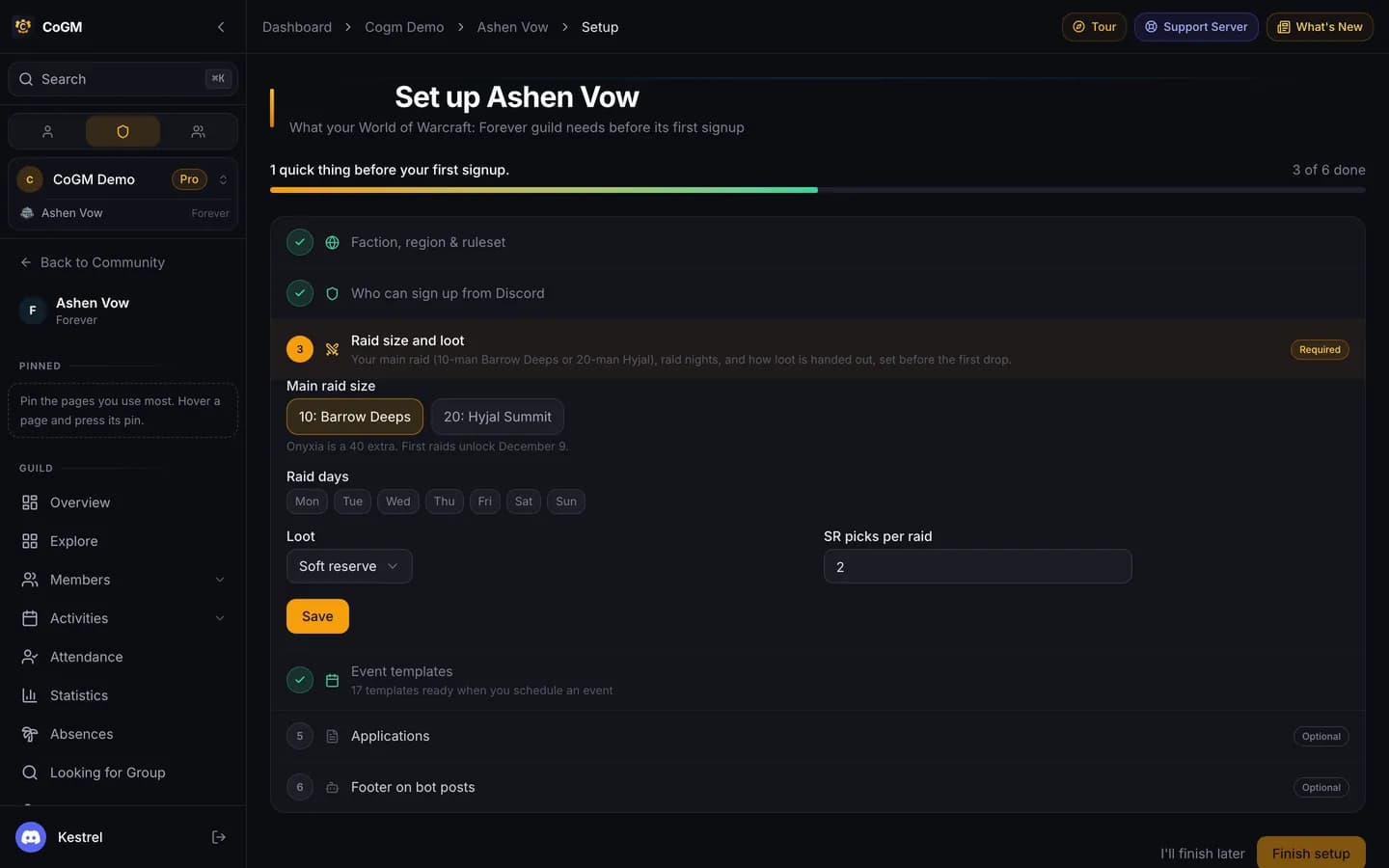
Only the guild owner and community admins can open the setup page. Open a row, fill it in, and press Save. When nothing required is left, press Finish setup. I'll finish later leaves the page, and the guild overview links back until you finish.
Pro trial
Required
Faction, region and ruleset
Alliance or Horde, your region (NA, EU, KR or TW), and your ruleset: Normal, PvP, Roleplaying. Forever has no realms, and you only group with players on the same ruleset and faction, so a guild keeps one of each. If you picked these when you created the guild, the row is already done.
Who can sign up from Discord
Pick the Discord role your members have. Anyone with it can sign up from Discord and is added to the roster. The officer role is optional. If the community has no Discord server yet, connect one first, or skip this row until you do.
Raid size and loot
Pick your main raid: 10 for Barrow Deeps or 20 for Hyjal Summit. Onyxia's Lair is a 40-player extra. Tick your raid days. Then pick how loot is handed out: Soft reserve, Loot council, or MS > OS. With soft reserves, also set how many items each raider can reserve per raid, from 1 to 4.
You can come back to this row any time. Settings > Game links to it.
Event templates
Save adds 17 ready-made templates. You pick one when you schedule an event, and they are the list /attendance offers in Discord:
- Raids: Barrow Deeps, Hyjal Summit, Onyxia's Lair
- Dungeons: The Hall of Thanes, Ruins of Lordaeron, Excavation Site: Wetlands, City of Dalaran, The Drowned City, Krol'dok Stronghold, Alcaz Prison, Blackmaw Hold, Shaper's Terrace, Classic 5-man
- PvP: Darkspear Islands, Warsong Gulch, Arathi Basin, Alterac Valley
Edit them later under Activities > Templates. Saving this row again puts back their original settings.
Optional
Applications
Tick Create the Forever guild application form and press Save. The form asks for the first and last name, ruleset, faction, race, class, main role, raid nights, timezone, and anything else. Players apply on cogm.app or with /apply in Discord, on every plan.
Footer on bot posts
The small line at the bottom of every CoGM post in your Discord. Your guild name works fine.
After setup
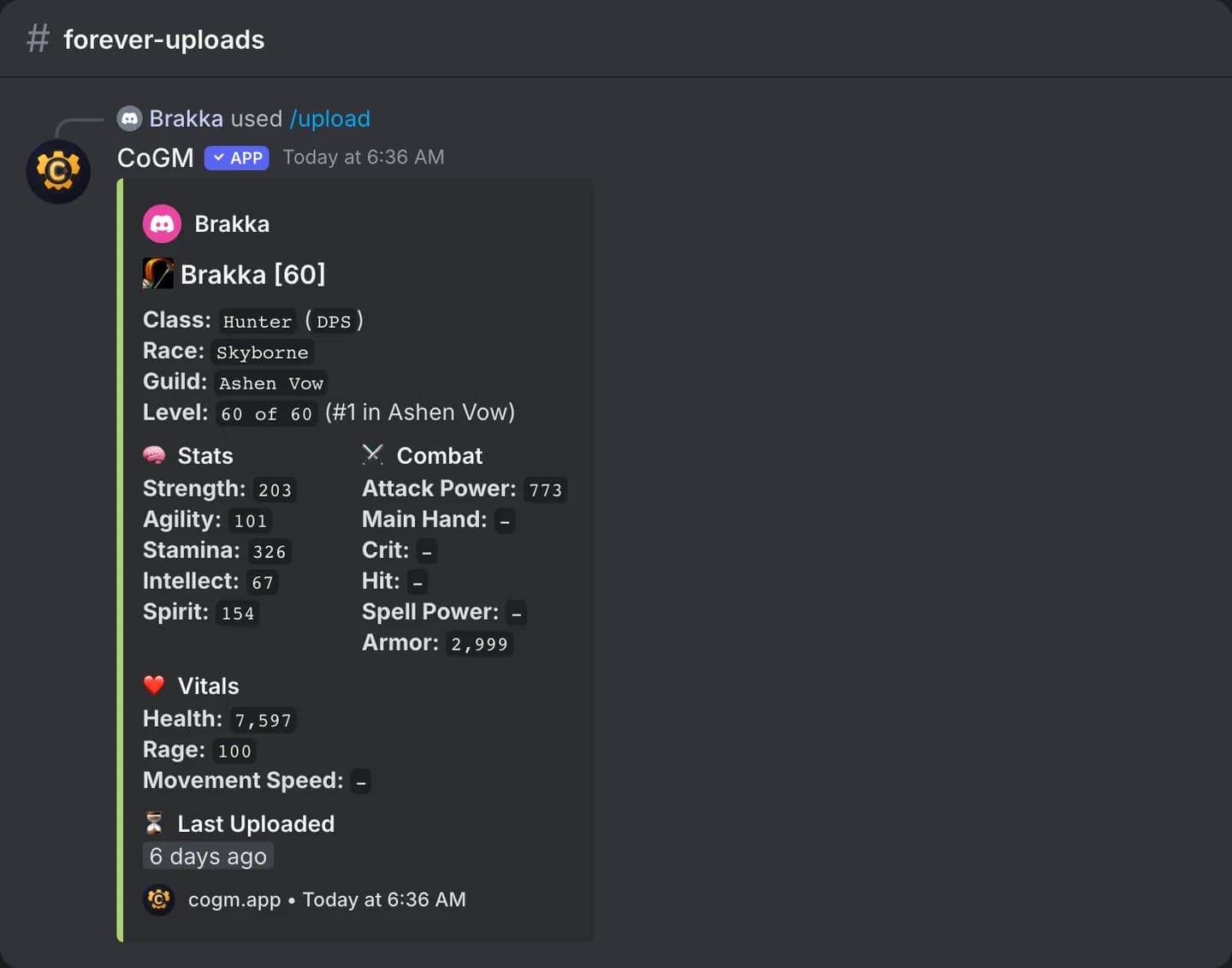
Ask members to run /upload in Discord with a screenshot of their character panel (press C in game). The bot reads the name, level, class and stats, adds the character if it is new, and posts its card.
- Post your first raid from a template. With soft reserves, raiders enter their picks on the event page.
- Set up DKP, loot auctions and the Guild Bank (all on Pro). See DKP, Loot and Guild Bank.
- Everything CoGM does for Forever: WoW Forever.