Free
Audit Log
Every action officers, the bot and CoGM take, in plain sentences. Read it for the whole community or for one guild.
Who can see it
- Every game. Free on every plan.
- Community view: open Audit Log in the community sidebar. It shows every guild and the community itself. The community owner sees it, and so does anyone whose community role has View Audit Log. Everyone else gets a page not found.
- Guild view: open Audit Log in a guild's Admin section. It shows that guild's actions, plus community actions about its members. The community owner, community admins with Manage Guilds, and anyone whose guild role has the guild's View Audit Log permission see it. A guild permission never shows another guild's log.
Set these permissions on the Permissions page.
Read the board
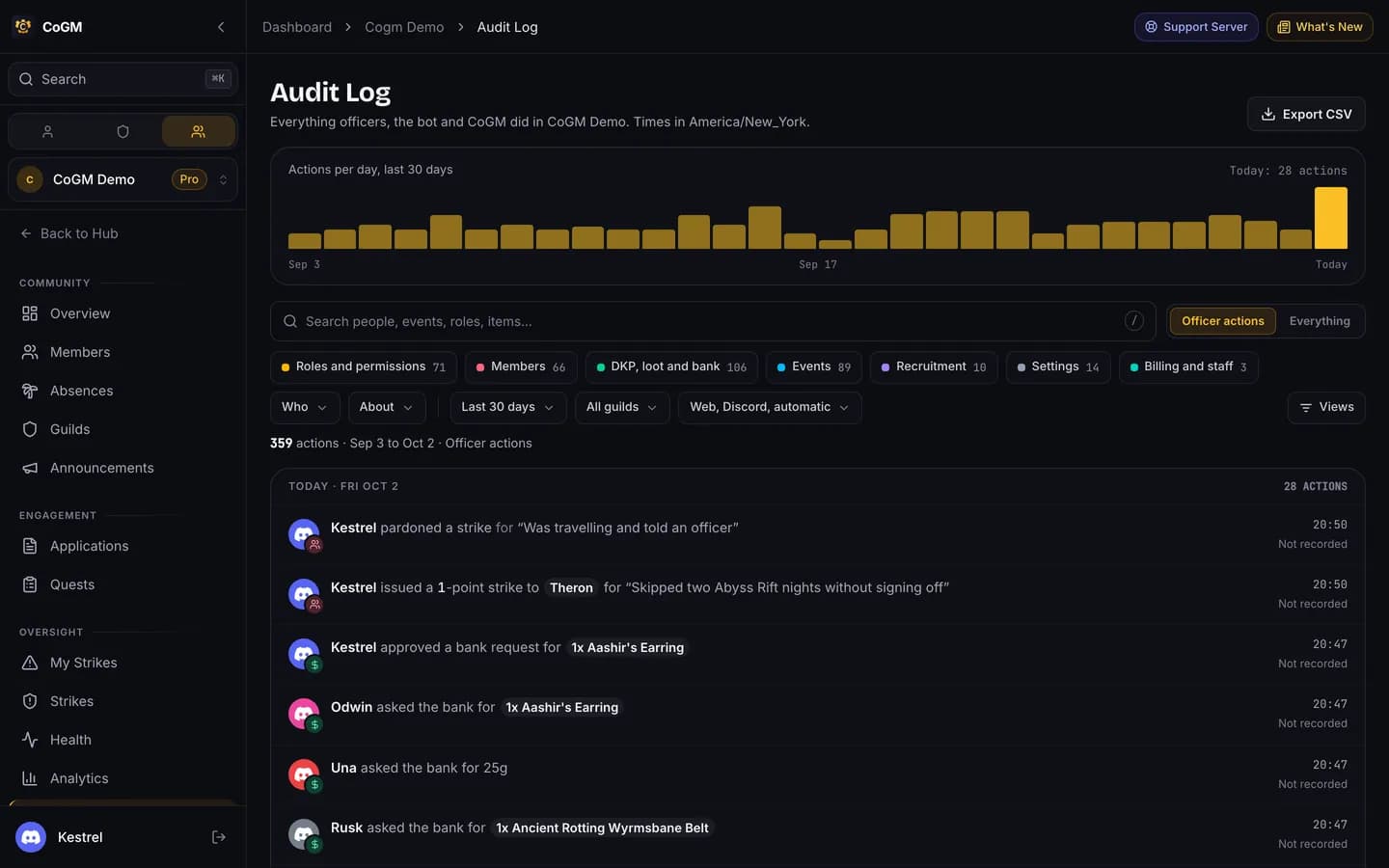
- Actions per day: a bar for each of the last 30 days, with today's count. Press a bar to list that day only.
- Categories: Roles and permissions, Members, DKP, loot and bank, Events, Recruitment, Settings, Billing and staff, and Member activity. Each chip shows its count. Press one or more to narrow the list.
- Officer actions or Everything: Officer actions hides routine entries and what members do for themselves. Everything shows them too.
- Filters: search people, events, roles and items, then narrow by Who did it, About whom, the date range (today up to the last year), the guild, and where it came from: the web, Discord, or CoGM on its own. Views offers ready-made filters such as Role and permission changes; Kicks, bans and archives; DKP and loot this week; or My actions.
- The list: each action is one sentence, such as "Kestrel issued a 1-point strike to Theron", grouped by day, newest first. Press Load older to go further back.
The detail panel
Press any row to open its details on the side:
- What changed: each field with its value before and after.
- When and Where: the time, and whether it came from the web, Discord or CoGM itself.
- Guild: the guild it belongs to.
- Part of the same action: other rows written by the same change, such as a bulk DKP award.
- Links to open the member or the event, or the entry in the DKP ledger, and the raw details for support.
Export
Export CSV downloads the actions that match your filters.
Times
Times show in your community's time zone, named under the page title.